
Retrowave Car Portrait: Redrawing Photos in 80s Style
This prompt transforms an ordinary car photo into a vibrant retrowave illustration in the 80s spirit - neon, chrome, grid, and sunset. Perfect for designers and car enthusiasts.
Ready prompt
Transform the uploaded photo of [car make and model] into a vibrant retrowave / synthwave illustration in the style of the 1980s.

Style & Aesthetic:
- Visual style: retrowave, synthwave, vaporwave, outrun
- Rendering: semi-realistic digital painting with neon glow effects
- Color palette: deep purple, hot pink (#FF007F), electric blue (#00FFFF), chrome silver, sunset orange - all against a near-black background
- Lighting: dramatic neon rim lighting on the car body, glowing headlights, reflections on wet asphalt

Composition:
- Camera angle: [choose: front 3/4 angle / side profile / low front shot]
- Background: retro grid perspective (vanishing point grid floor), large gradient sunset sky with horizontal bands of purple → pink → orange, optional silhouette of palm trees
- The car occupies 60-70% of the frame, centered
- Lens: wide-angle, slight lens flare

Details to preserve from the source photo:
- Original body shape and silhouette of the car
- Wheel design and proportions
- Distinctive design features (grille, headlights, spoiler if present)

Additional elements:
- Chrome details highly reflective and stylized
- Add subtle laser grid lines on the road surface
- Optional: retro-style text badge «[custom text]» in 80s neon font at the bottom corner
- Film grain texture overlay (subtle)

Negative prompts (avoid):
- modern CGI look, photorealism, watermark, blurry, low quality, cartoon, anime, sketch, grayscale, daytime lighting, people in frame
Fill in variables 3
Enter your values - the prompt will update automatically.
How to use
- Prepare the car photo. Choose a clear image with a well-visible silhouette of the car. Images with a neutral background or side/front angles work best.
- Fill in the placeholders. Specify the car make and model, choose the desired camera angle, and create text for the retro badge (or remove this block if not needed).
- Upload the photo and insert the prompt. In Midjourney, use the /imagine command with the attached image (image prompt + text prompt). In ChatGPT/DALL-E 3 or FLUX, upload the photo and then insert the prompt text.
- Set the generation parameters. In Midjourney, add --ar 16:9 for a widescreen result and --stylize 750 to enhance the artistic style. The --iw 1.5 parameter will increase the influence of the original photo.
- Iterate the result. If colors are too saturated, add "subtle neon" at the beginning of the prompt. If the car silhouette has changed, increase --iw to 2.0 or specify a more precise body description.
- Final touch-up. The best result can be refined in Adobe Photoshop or Canva: enhance the bloom effect on neon, add VHS noise or chromatic aberration for an authentic retro look.
Example result
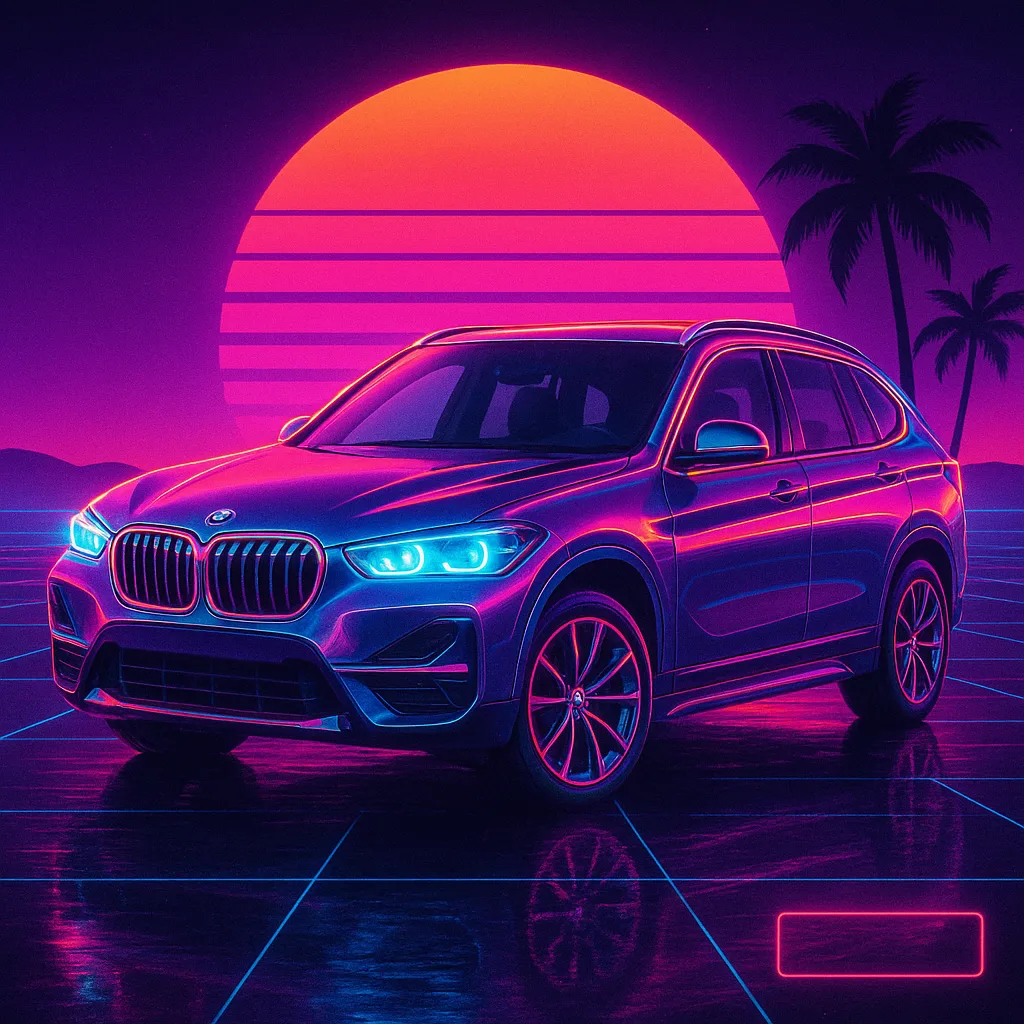
- Style
- Retrowave / Synthwave, outrun digital painting
- Composition
- Front 3/4 angle, car occupies 65% of the frame, perspective grid on the road
- Color Palette
- Deep purple background, neon pink (#FF007F) car outline, blue (#00FFFF) headlights, chrome details reflecting sunset
- Background
- Retro grid with vanishing point, gradient sunset purple → pink → orange, silhouettes of palm trees
- Textures
- Light film grain, laser lines on asphalt, lens flare from headlights
- AI
- Midjourney v6, DALL-E 3, FLUX.2 Pro
Using this prompt, the AI creates a stylized car portrait reminiscent of a synthwave album cover: the car bathes in neon glow against an endless retro grid and purple sunset. Chrome details reflect sunset hues, headlights shine with electric blue, permeating the frame with the atmosphere of a 1986 night race.
Tips and variations
- Enhance the "film-like" feel: Add "VHS scanlines, chromatic aberration, analog film grain" to the end of the prompt for an authentic 80s video cassette texture.
- Control car silhouette: If the AI distorts the body shape, add precise characteristics to the prompt: "keep original body lines, preserve roof silhouette, accurate wheel arch shape." In Midjourney, raise --iw to 2.0.
- Color scheme variations: Replace "hot pink + electric blue" with "lime green (#39FF14) + deep orange" for a Miami Vice style, or "gold + white" for a more elegant chrome variant.
- Add movement: Insert "motion blur on rear wheels, speed lines, dynamic dust particles" to add a sense of speed and dynamics to the frame.
- Format and aspect ratio: For posters, use --ar 2:3 (vertical), for desktop wallpapers - --ar 21:9, for social media - --ar 1:1 with centered composition.
Alternative AIs: Adobe Firefly (the "Reference image" feature accurately preserves the car shape), Stable Diffusion with Dreamshaper XL model + ControlNet Canny (maximum silhouette control), Leonardo.ai with "Anime General" preset + manual style adjustment to retrowave.