
Photo Clothing Swap: Change Style Without Altering Pose
A prompt for swapping clothing in a photo while preserving pose, face, and body proportions. Perfect for stylists, fashion bloggers, and designers.
Ready prompt
Task: Replace the clothing on the person in the provided photo with a new outfit in a completely different style, while keeping the pose, body proportions, face, skin tone, hair, background, and lighting exactly the same.

Clothing style to apply: [clothing style - e.g.: streetwear, formal business suit, bohemian summer dress, cyberpunk outfit]

Specific garment details:
- Top: [top description - e.g.: oversized white hoodie / tailored navy blazer]
- Bottom: [bottom description - e.g.: slim black trousers / floral midi skirt]
- Footwear: [footwear - e.g.: white sneakers / black oxford shoes]
- Accessories: [accessories - e.g.: silver chain necklace / leather belt, or "none"]

Color palette: [new clothing color palette - e.g.: monochrome black, earth tones, pastel pink and white]

Material & texture hints: [material - e.g.: matte cotton, shiny silk, distressed denim]

Strict preservation rules:
- Do NOT change the person's face, facial expression, or hairstyle
- Do NOT alter the body pose or limb positions
- Do NOT modify the background or environmental lighting
- Do NOT change skin tone or body proportions
- Ensure natural fabric draping and realistic fit on the body
- Shadows and highlights on the clothing must match the original light source direction

Output quality: photorealistic, high-resolution, seamless clothing integration, no visible artifacts or blending errors.
Fill in variables 2
Enter your values - the prompt will update automatically.
How to use
- Prepare the photo: Select a clear photo of the person with good lighting. The pose should be fully visible or at least waist-up.
- Fill in the placeholders: Replace all values in square brackets with specific descriptions of the desired look - style, clothing, colors, materials.
- Upload the photo to the AI tool: Use ChatGPT (GPT-4o), Adobe Firefly, Stable Diffusion with inpainting or FLUX Fill - insert the prompt and attach the image.
- Run the generation: Send the request. If the tool supports masking, manually highlight the clothing area for precise results.
- Evaluate the result: Check for the preservation of pose, face, and background. If there are artifacts - rerun or refine material/color descriptions.
- Refine if necessary: Add refinements, such as "keep original arm position strictly" or change material parameters for a more realistic result.
Example result
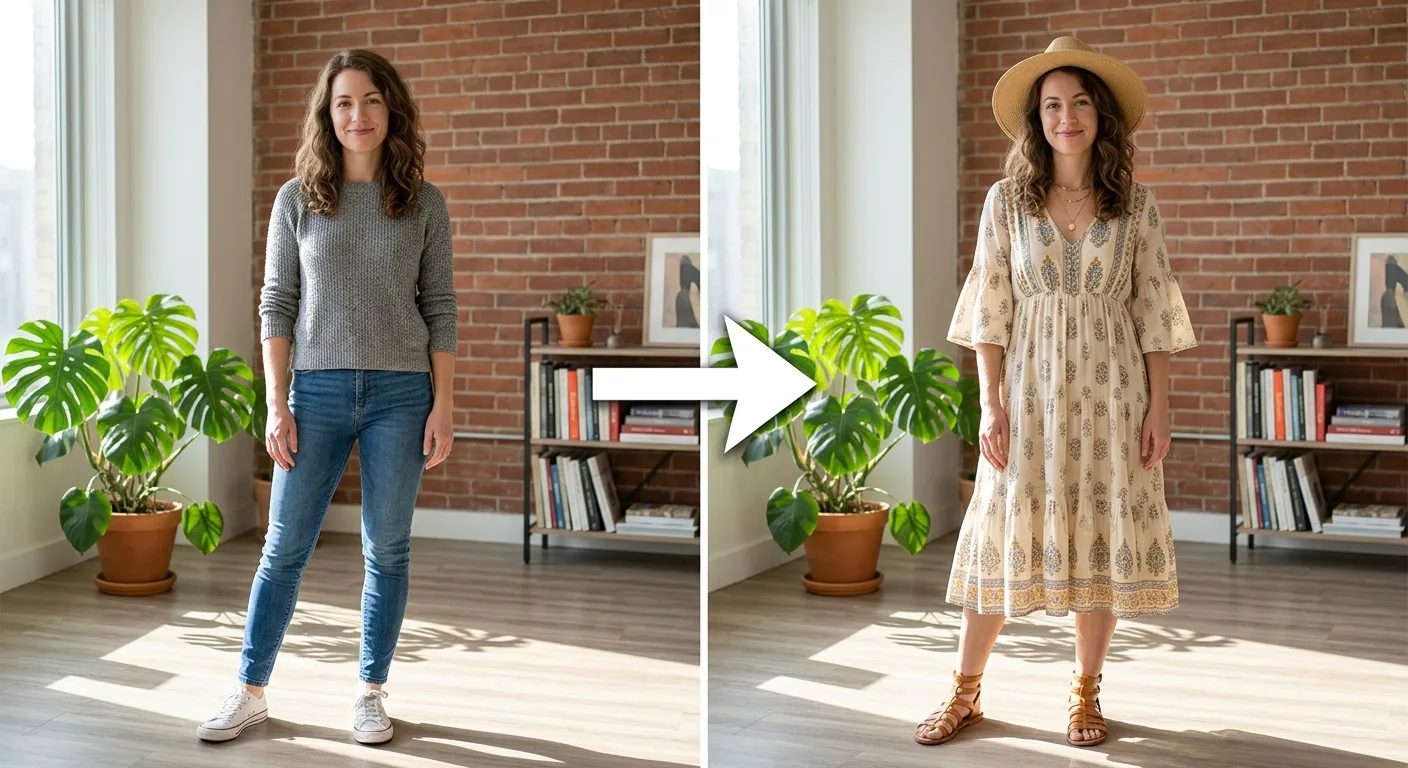
- Style
- Photorealistic, studio lighting, high resolution
- Clothing Swap
- Casual everyday → business suit (navy blazer + slim trousers)
- Preserved
- Pose, face, expression, hairstyle, background, skin tone
- Color Palette
- Dark navy, white, gray
- Neural Network
- ChatGPT GPT-4o, Adobe Firefly, FLUX Fill
Using this prompt, the neural network accurately replaces the clothing with the chosen style, preserving all facial features, pose, and background without changes. The fabric drapes naturally over the body, shadows and highlights align with the original light source - the result looks like a professional photo shoot in the new outfit.
Tips and variations
- Use inpainting mask: In Stable Diffusion and FLUX Fill manually highlight only the clothing area - this gives maximum control and minimizes changes to face and background.
- Specify lighting: Add the original lighting description to the prompt (e.g., "soft natural light from the left") - this helps AI choose shadows on the new fabric more accurately.
- Test different materials: Try replacing "matte cotton" with "glossy silk" or "heavy wool" - the texture of the fabric greatly affects the realism of the result.
- Multiple iterations: Run the generation 3-5 times with the same parameters and choose the best option - AI models give different results each time.
- For complex poses: Add "pay special attention to arm and hand placement - do not alter limb positions" to the end of the prompt for poses with raised or bent arms.
Alternative neural networks: Adobe Firefly (Generative Fill) is the best option for working with masks and realistic clothing replacement. FLUX Fill and Stable Diffusion XL Inpainting are perfect for local replacements. ChatGPT GPT-4o is convenient as a starting point without setting up tools.