
NotebookLM
- Free for personal use, Workspace from $6/mo
- Web version with Google Drive integration
- 35+ languages including Russian
- Up to 50 sources per notebook, 500,000 words per document
- Unique AI podcasts from your materials
Google's NotebookLM is an AI research assistant that analyzes uploaded documents and answers questions with mandatory source citations. The tool transforms PDFs, Google Docs, YouTube audio and video into structured notes, summaries, and even audio podcasts with two AI hosts.
Launched in 2023, NotebookLM addresses the main issue of conventional chatbots - hallucinations. Each response is accompanied by a direct link to the document fragment, making the tool reliable for academic research, business analysis, and learning.
Key Features of NotebookLM
- Source Analysis up to 500,000 Words - upload PDFs, Google Docs, presentations, text files, audio, and YouTube video. AI analyzes the content and provides accurate answers with citations.
- Audio Overviews - Podcasts from Documents - a unique feature that converts texts into 10-20 minute conversations between two AI speakers, discussing the key points of your materials.
- Work with 50 Sources Simultaneously - ask questions covering all uploaded documents. AI finds connections between materials and synthesizes information.
- Intelligent Note-taking - automated creation of structured summaries, key findings, and lecture notes from meetings or research. Supports audio recordings up to 3 hours.
- Mind Map Generation - automatic mind map creation based on documents to visualize connections between concepts.
- Citation of Every Fact - all responses are accompanied by direct citations indicating the exact location in the text, minimizing hallucination risk.
- Customizable Response Styles - adjust the length and tone of responses: brief, detailed, academic, or analytical.
Advantages and Disadvantages
- Responses only with source citations
- Unique audio podcasts from documents
- Free plan for personal use
- Data protection at Google Cloud level
- Integration with Google Workspace
- No full chat history
- Dependent on source quality
- File limit of 200 MB
NotebookLM Pricing and Plans
- Basic NotebookLM features
- Document and note uploads
- Audio overviews
- Limited number of sources
- Part of Google Workspace Business
- Up to 50 sources per notebook
- Extended audio overviews
- Priority processing
- Drive integration
- Everything from NotebookLM Plus
- Corporate data protection
- Team management
- Enhanced collaboration
- Priority support
Prices are listed for annual billing. A 14-day trial period is available for Workspace plans. The basic version is completely free for personal use.
Comparison with Competitors
Unlike ChatPaper, which specializes in scientific papers without audio features, NotebookLM works with any format and creates podcasts. ThesisAI focuses on generating academic texts, whereas NotebookLM focuses on analyzing existing documents. Notion AI is integrated into a note-taking platform but generates responses without source attachment, while NotebookLM necessarily cites each fact.
Consensus specializes in searching scientific publications in databases, while NotebookLM analyzes documents of any type you upload-from corporate reports to lecture notes. The unique Audio Overviews feature is absent in all the competitors mentioned.
Usage Scenarios
Who is NotebookLM For
- Students and Researchers - analysis of scientific literature, exam preparation, lecture note-taking, and coursework writing with source citations.
- Business Analysts - quick analysis of financial reports, strategic documents, market research for decision-making.
- Teachers - creation of educational materials, lesson plans, organization of educational content, and development of interactive resources.
- Sales Professionals - uploading product specifications and competitive analysis for quick negotiation preparation.
How to Get Started with NotebookLM
-
1Go to notebooklm.google.com - log in with your Google account. No registration needed, just an existing profile.
-
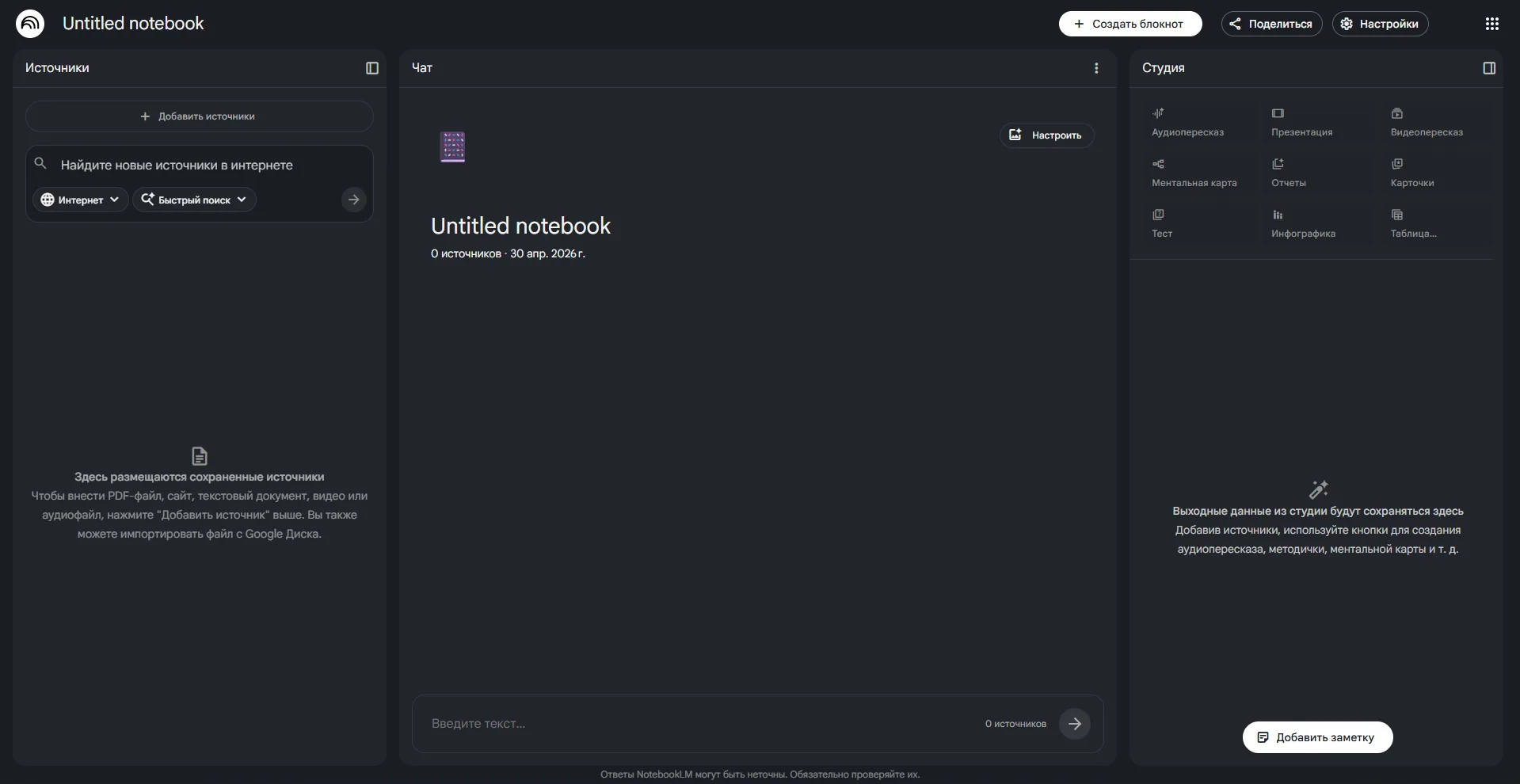
2Create your first notebook - click "New Notebook" and upload up to 50 documents: PDFs, Google Docs, audio or YouTube links.
-
3Ask questions - use chat to analyze the documents. All responses will contain direct citations from your sources.
-
4Create an audio overview - click "Generate Audio Overview" to convert materials into a 10-20 minute podcast.
2025 Updates
In 2025, Google significantly expanded NotebookLM: added support for YouTube videos and audio files as sources, introduced enhanced chat settings for response style customization. Improved Audio Overview generation with more natural voices and adjustable conversation focus. NotebookLM is now integrated into all Google Workspace plans, including Business Starter, Standard, and Plus. Plans for adding interactive interaction with audio overviews and supporting additional file formats were announced.
Frequently Asked Questions
Is NotebookLM free?
Yes, the basic version of NotebookLM is completely free for personal use. Advanced features are available in Google Workspace subscriptions from $6/mo.
Is NotebookLM available in Russian?
Yes, NotebookLM supports 35+ languages, including Russian. You can upload Russian-language documents and receive answers in Russian with accurate citations.
Why is NotebookLM better than ChatGPT for learning?
NotebookLM works only with your documents and cites each fact, minimizing hallucinations. ChatGPT generates responses based on general knowledge without attachment to specific sources.
How to create an audio overview in NotebookLM?
Upload documents to the notebook, click "Generate Audio Overview" on the right panel. In a few minutes, receive a 10-20 minute podcast discussing key points.
Is it safe to upload confidential documents?
Yes, Google ensures that uploaded documents are not used to train models. Data is protected by Google's corporate security standards
Conclusion
NotebookLM is a powerful document tool, distinguished by mandatory source citation and unique audio overviews. The free plan makes advanced AI technologies accessible to students and researchers, while integration with Google Workspace simplifies work for business users. Try NotebookLM to analyze your materials and transform documents into interactive notes and podcasts.