
Cyberpunk Portrait: Neon Lighting Generation
A ready-made prompt for creating a stylish cyberpunk portrait with neon lighting. Suitable for beginners - just replace the character's name and details.
Ready prompt
Cinematic cyberpunk portrait of [character], [age and appearance], glowing neon lights in [neon color] and [second neon color], futuristic urban background with rain-slicked streets, neon signs, holographic billboards.

Lighting: dramatic rim lighting, neon glow on face and shoulders, deep shadows.
Style: neo-noir cyberpunk, photorealistic, cinematic grade, ultra-detailed skin texture.
Camera: close-up portrait, shallow depth of field, 85mm lens.
Mood: mysterious, intense, dystopian.

Negative: blurry, cartoon, anime, low quality, overexposed, flat lighting, text, watermark.
Fill in variables 4
Enter your values - the prompt will update automatically.
Suitable AI tools
These neural networks handle the task best. Open the overview to learn about capabilities and pricing.
How to use
- Copy the prompt text and fill in all placeholders in square brackets - describe the character, appearance, and choose neon colors.
- Paste the completed prompt into Midjourney (command /imagine) or the Stable Diffusion query field.
- For Midjourney, add the following parameters at the end: --ar 2:3 --v 6 --style raw - this gives a portrait format and realistic result.
- If the result is too dark, add the phrase “bright neon glow, high contrast”. If you want more facial details, add “hyperrealistic face details”.
- Generate four variants and choose the best, then press Upscale for final quality.
Example result
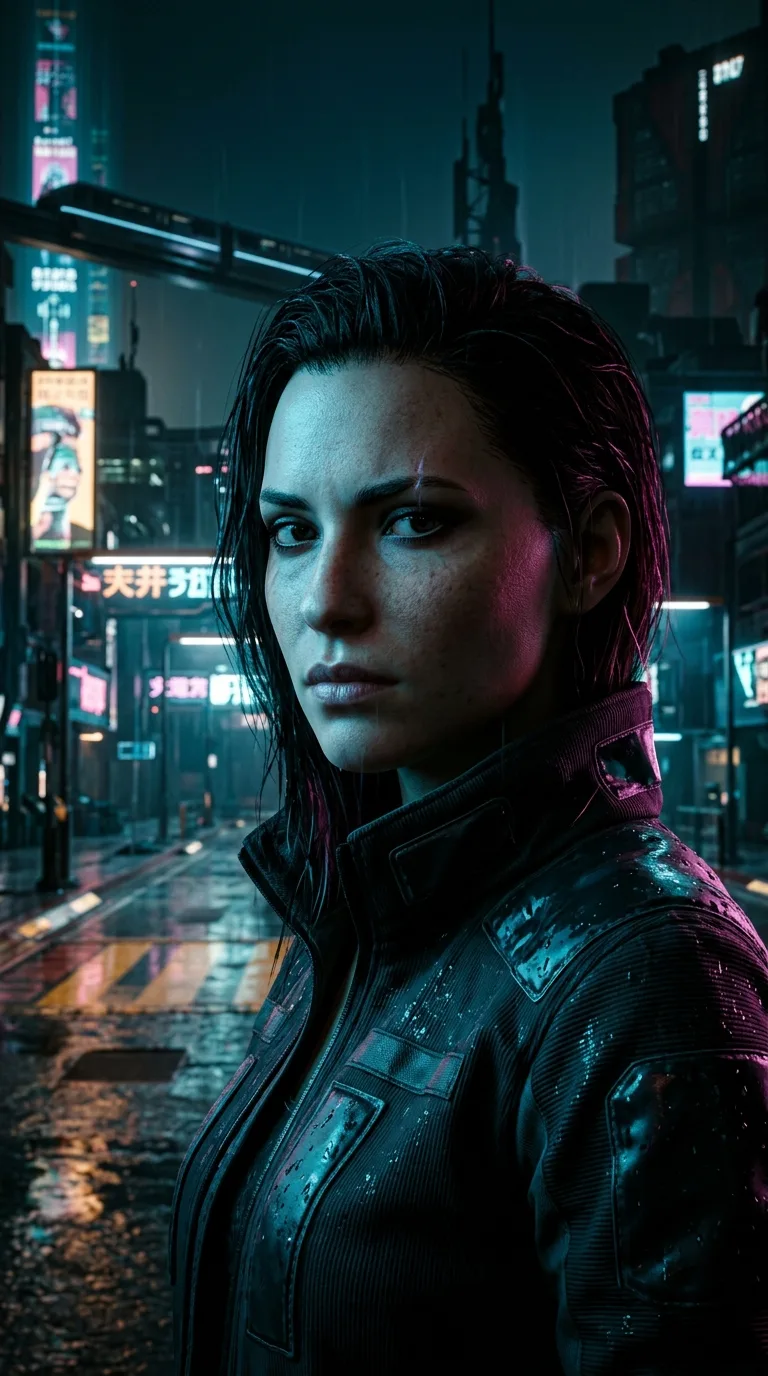
- Style
- Neo-noir cyberpunk, photorealism, cinematic grade
- Composition
- Close-up, shallow depth of field, 85mm lens
- Lighting
- Neon rim along shoulders and face, deep shadows, rainy night
- Color Palette
- Purple + orange neon on a dark background
- Neural Network
- Midjourney v6, Stable Diffusion XL
Using this prompt, the neural network creates a cyberpunk-style portrait: the character's face is lit by sharp neon light in two contrasting colors, the background is blurred and contains neon signs and wet pavement. The final image looks like a frame from a high-budget sci-fi movie.
Tips and variations
- Enhancing Realism: Add the phrase “shot on Sony A7R, 8K resolution, pore-level skin detail” to make skin and textures significantly more detailed.
- Changing Mood: Replace “mysterious, intense” with “melancholic, tired” or “fierce, aggressive” - the portrait's mood will change completely.
- Cyberpunk Accessories: Add details like “cybernetic eye implant”, “neural interface on temple” or “LED tattoos on neck” for a deeper immersion into the genre.
- Format and Aspect Ratio: Use --ar 1:1 for a square avatar, --ar 2:3 for a portrait, or --ar 16:9 for desktop wallpaper.
Alternative Neural Networks: This prompt works great in Adobe Firefly (Text to Image tab), Leonardo.ai (PhotoReal model), and Playground AI. In DALL·E 3, remove the technical camera parameters - it ignores them but understands style and mood well.